Application Inventory
Application Inventory is a utility that scans your computer for installed programs and generates a configurable report listing file version information about the files that that were discovered. Optional follow-up scans are then automatically initiated to cross-reference the file scan results with windows .lnk shortcuts and/or references in the windows registry. Icon indicators show the presence of .lnk and/or registry references. Details on file properties, shortcuts, and registry keys are available by highlighting a file and then using 'Properties' and 'References' dialogs. Include and exclude filters can be used to define the scan by path &/or string(s) found in file version information. The fields included in the results are configurable.
For example, you can list (or not) File Version, File Description, Internal Name, Copyright, File Path, etc. Results can be copied to the clipboard, printed, or saved in a delimited file you specify. Application Inventory can also launch windows explorer on the path containing a file in the results list.
Application Inventory Main Dialog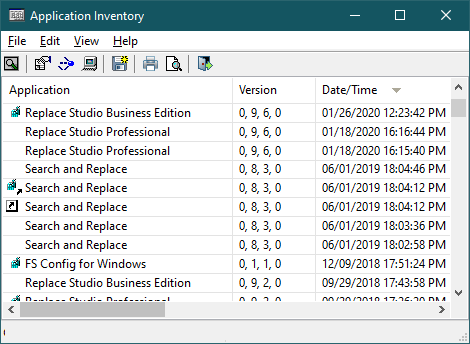
Application Inventory locates all .exe files on your computer, not just those that are installed via a standard installer. This means the program is useful for tracking down all .exe files on your computer. The results can be sorted or searched (press F3) to help you locate alike files. The program defaults to looking for .exe files but a special switch is available to look for any specific file type. Finally, although Application Inventory is intended as a reporting tool, you can use the various windows properties sheets for files and shortcuts to make actual edits. Do so at your own risk though.
Application Inventory is available in 32-bit and 64-bit (x64) versions. Application Inventory is compatible with Windows Vista, Windows 7, Windows 8, & Windows 10.
Application Inventory Installers
Application_Inventory-Demo-Installer-32bit.exe (1.4 MB) - Self-installing version for 32-bit Windows. Save this to a temporary director and run 'Application_Inventory-Demo-Installer-32bit.exe' to install. The default installation path is C:\Program Files\AppInv but you can change that if you like. No files are added to your 'system' subdirectory and the setup includes an uninstall function.
Application_Inventory-Demo-Installer-x64.exe (1.5 MB) - Self-installing version for 64-bit Windows (x64). Save this to a temporary director and run 'Application_Inventory-Demo-Installer-x64.exe' to install. The default installation path is C:\Program Files\AppInv but you can change that if you like. No files are added to your 'system' subdirectory and the setup includes an uninstall function.
Additional Information
License Statement - See EULA Statement (End User License Agreement)
Purchase Information - See information on pricing & purchase options.
Purchase Now - https secure online registrations.