TZAdjust
 TZAdjust, one of our freeware products, is a legacy era utility we created for users who need to make manual changes to the time zone and 'day light savings' offset parameters for their Windows 10 and above computers (64-bit x64).
Background: Windows automatically returns file time information as an offset from Greenwich Mean Time (GMT) and automatically makes Daylight Savings compensations when reporting file times.
We recommend that Windows 10 users go to Settings -> Time & Language -> Time & Date Time as the first step for checking and/or changing time zone and automatic daylight savings compensation. Search https://support.microsoft.com for 'How to set your time and time zone' for more information.
We strongly recommend that users use the default Windows time zone and daylight saving settings. However, if you have an older operating system or have a specific need to make changes manually, TZ Adjust can be used to disable "Automatically Adjust for Daylight Savings" entirely or modify the offset used.
TZAdjust is compatible with Windows Windows 10 and above (x64).
See License Statements for the EULA agreement for TZAdjust.
TZAjust Main Dialog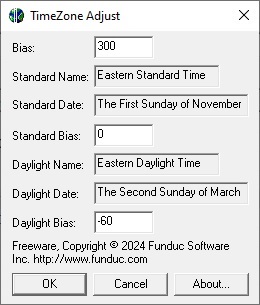
Notes
-
Changing time zone-related settings on your computer may have global implications beyond reported file times by Explorer or our Directory Toolkit utility. For example, events listed in the operating system event log may be affected or clients on an Exchange server may find that emails show the wrong time stamp.
-
Our Directory Toolkit has the ability to compare two paths for alike vs. different files using names, size, & time stamp. Users sometimes find that that the OS handling of reported file time stamps complicates their path comparisons. For example, if all your computers are not set to the default Daylight Savings settings, changes from daylight & standard time will result in path comparisons that was previously synchronized may suddenly show up as being out of synch by an exact hour value. We recommend leaving computers set to the default OS handling for time changes and recommend against using TZAdjust for one-time changes to file time reporting. If you need to perform a large scale 'Touch' operation to change many file times our FS Touch may be useful. Please see our own document, "Daylight Savings, Standard Time & Reported File Times" for further description and suggestions for Directory Toolkit.
TZ Adjust Download
Time_Zone_Adjust.zip (Version 1.9 MB) - Unzip this to the subdirectory of your choice. We recommend using c:\tools\TZAdjust although any path will do. See 'Install.txt' and 'ReadMe.txt' in the distribution for more information.
Additional Information
License Statement - See EULA Statement (End User License Agreement)