Shortcut Doctor
How many Windows program & file shortcuts are on your computer? 100? 200? 500? And how many are "ill" because you moved something to another directory or deleted a program or changed your network drive maps? Not sure? You can always roll up your sleeves, test them one at a time and coax Windows to try a fix. Or you can work smart & can call on the Shortcut Doctor.
Shortcut Doctor checks your Windows shortcuts to see which point to targets that can no longer be found. The Doctor can then edit or resolve invalid shortcuts, search and replace shortcuts pointing to a certain drive or directory with another (with or without validation), search & replace shortcut command parameters, or delete shortcuts to the Recycle Bin. All shortcuts on a drive can be displayed, regardless of whether they are healthy or not. Operations can be set to ignore paths such as CD-ROM or network drives. Internet shortcuts can also be triaged for errors, edited, or created. Output in the Results List can be written to a file - perfect for diagnostic reports. Shortcut Doctor can also empty the Recent Documents list at the click of a button.
The program is compatible with Windows Vista and above.
A command line script function lets you automate complex operations and control program options in effect. For example, you can disable path validation before search-replace operations - useful for setting up shortcuts that might not be valid until they are transferred to a remote machine.
Command line functions also allow you to create shortcuts from scratch by specifying the path/file name for the .lnk file to create, the path to the program to launch, and any special command line parameters for that program. See Shortcut Doctor F1 hlp for usage details.
There is also a function to disable (or enable) automatic shortcut resolution for shortcuts that reference mapped network paths, thus giving you a chance to intervene with those shortcuts that seem to have a mind of their own when network mappings change. For more information on dynamic shortcut resolution and UNC path tracking, search the MS Knowledge Base at support.microsoft.com. Article Q150215 is a good starting point.
The program also has advanced file mask filters to allow you to ignore shortcut files based on their physical location on your disk. This can be combined with "Path Ignore", e.g., skip any shortcut that references \\netdrive\c and any shortcut in c:\windows\start menu\programs\games. File Mask can also be specified in script files with the Mask= parameter.
Important: Shortcut Doctor does not automatically assign itself 'administrator level' program on your computer. Shortcut Doctor must be run 'As Administrator'. Do this by right clicking on the program shortcut and select 'Run As Administrator' to run the program. This should be done even if your Vista user account is one with full access permissions. Alternatively you can manually modify the shortcut properties for the shortcut to launch the program (Right click on the shortcut; Click on Shortcut tab; Click on Advanced; Check 'Run as administrator').
Shortcut Doctor Main Window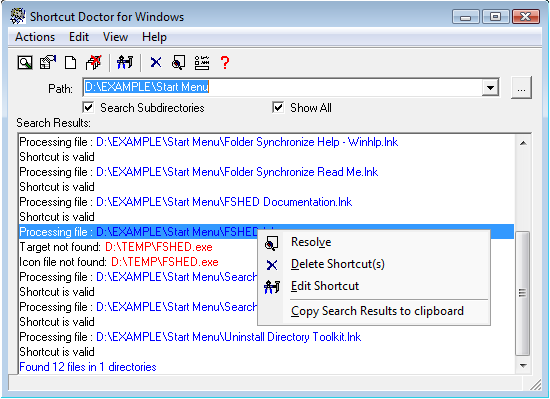
Some Program Features
- Use the "Shortcut to" prefix or whatever you want.
- Automatically insert Network Drive Mappings into the replace dialog.
- No long office waits - it's fast. fast, fast.
- Drag and Drop a shortcut into Shortcut Doctor & it'll open in the editor.
- Configurable display colors.
- Low $15 shareware co-pay.
- Support is available in the Help File and from support@funduc.com
Shortcut Doctor Installers
Shortcut_Doctor-Demo-Installer-32bit.exe (720K) - Installer for 32-bit Windows. Download this to a temporary directory and run Shortcut_Doctor-Demo-Installer-32bit.exe. Shortcut Doctor will be installed to the directory of your choice. No files are added to your 'system' subdirectory and the setup includes an uninstall function. See Install & Uninstall Information for additional guidance about installation and removal.
Shortcut_Doctor-Demo-Installer-x64.exe (815K) - Installer for 64-bit Windows (x64). Download this to a temporary directory and run Shortcut_Doctor-Demo-Installer-x64.exe. Shortcut Doctor will be installed to the directory of your choice. No files are added to your 'system' subdirectory and the setup includes an uninstall function. See Install & Uninstall Information for additional guidance about installation and removal.
Additional Information
License Statement - - See EULA Statement (End User License Agreement)
Purchase Information - See information on pricing & purchase options.
Purchase Now - https secure online registrations.
German interface - Available separately.
Optional German Interface
The German interface is now included in the basic installer. Follow the instructions as you install. To remove the interface, re-run the installer and de-select the choice to install the interface.