Replace Studio Pro
Replace Studio Pro is the next generation windows grep utility by Funduc Software. Now with the ability to search .pdf files (seach-only), Replace Studio Pro is a utility that easily searches through text-based files and, if you want, performs replacements with another string. The program can also do search/replace on .docx, .xlsx, .pptx, and 'Open Office' files (see documentation for instructions).
Replace Studio Pro can search in subdirectories and ZIP files. Searching can be configured to be case sensitive or not, based on 'whole words' vs. partial words, and to ignore 'whitespace' or not. Complex file masks and file filters let you further specify hich files to process. A built-in context viewer shows search results in the context of the found string. Optionally you can edit the original file directly using the context viewer or easily launch a viewer/editor of your choice. Replacements in ZIP files can be done on the fly - no need manually extract zip files first.
Like our Search and Replace utility, Replace Studio Pro has an extensive repertoire of regular expression functions that let you search or replace using 'wild card' operators. Replace Studio Pro has a 'Favorites' function that lets you save commonly used searches (or replacements) for later use. The main window supports drag n drop from Explorer into the 'File Mask & Path' fields and you can drag n drop files in the Search Results list into Explorer or an external editor that supports drag n drop. The program also has an extension to let you search search one or more files or an entire folder by right clicking in Windows Explorer and selecting 'Replace Studio Pro...'.
Replace Studio Pro is intended for interactive use via the program graphical interface. If you need to do fixed operations on many files via command line scripts see Replace Studio Business Edition, which is oriented toward command line functionality via scripts.
Please see a feature matrix for a comparison of our three windows grep utilities - Replace Studio Pro, Replace Studio Business Edition, and Search and Replace.
Replace Studio Proruns on Windows Vista, Windows 7, Windows 8, Windows 10, & Windows 11. Separate 32-bit and 64-bit versions are available. If you are running a 64-bit operating system you must use the 64-bit version of the program.
Replace Studio Pro Main Window
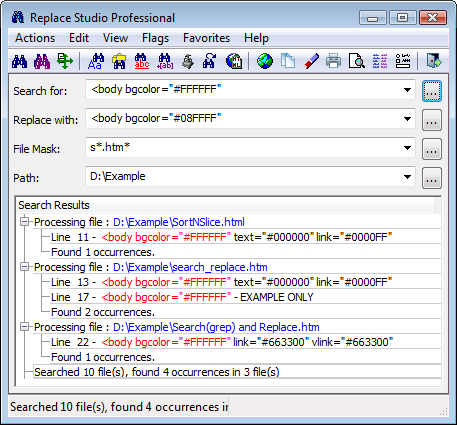
Note: As of v 7.8 of Replace Studio Pro the overall program display font face & size can be adjusted via a special program setting. A standalone configuration utility - FSConfig -is available to make it easier to make adjust the setting. See FSConfig or below for download information.
Search and Replace Users: Replace Studio Pro 'Favorites' use a different internal format than .srs Search and Replace scripts. .srs script files must be converted to the '.srx format' used by Replace Studio Pro before they can be loaded as a Replace Studio Pro 'Favorite'. A free conversion utility is available below or on the srxConvert page to convert .srs scripts to .srx format.
Note for Search and Replace customers: Installing either of the Replace Studio utilities will not interfere with your existing Search and Replace installation. The three utilities are 100% independent of each other.
Repl_Studio_Pro-Demo-Installer-x64.exe - 5.0 MB -This is a self-installing demo version installer for 64-bit Windows. See Install & Uninstall Information for guidance about installation and removal. Download this to a temporary directory and run 'Repl_Studio_Pro-Demo-Installer-x64.exe' to install.
Repl_Studio_Pro-Demo-Installer-32bit - 4.6 MB - This is a self-installing demo version for 32-bit Windows. See Install & Uninstall Information for guidance about installation and removal. Download this to a temporary directory and run 'Repl_Studio_Pro-Demo-Installer-32bit.exe' to install.
Additional Information
License Statement - See EULA Statement (End User License Agreement)
Purchase Information - See information on pricing & purchase options.
Purchase Now - https secure online registrations.
Supplemental Utilities
setupfsconfig.exe (1.1 MB) - This is the self-installing version of FSConfig - Funduc Software Configuration Utility for Replace Studio Pro and Business Editions. See Install & Uninstall Information for guidance about installation and removal. Download to a temporary directory and run 'setupfsconfig.exe' to install. The program is largely self-explanatory. A shortcut is created to usage documentation.
FSConfig.zip (0.8 MB) - This the a .zip version of FSConfig. To install, download this to a temporary directory and UnZip into the subdirectory of your choice. See 'Install.txt' and 'Readme.txt' in the zip for more information about install/uninstall and usage information.
srxConvert.zip (0.61 MB) - a free utility to convert Search and Replace .srs scripts to Replace Studio .srx Favorites/scripts. To install, download 'srxConvert.zip' and unzip the contents to the folder of your choice. See 'ReadMe.txt' and 'Install.txt' in the zip for install and uninstall and usage information. See the srxConvert page for more information.